Red Light
Red Light
Red Light
Designing Emergency UX for Women’s Safety
Designing Emergency UX for Women’s Safety
Designing Emergency UX for Women’s Safety

Case Study Positioning
Case Study Positioning
Case Study Positioning
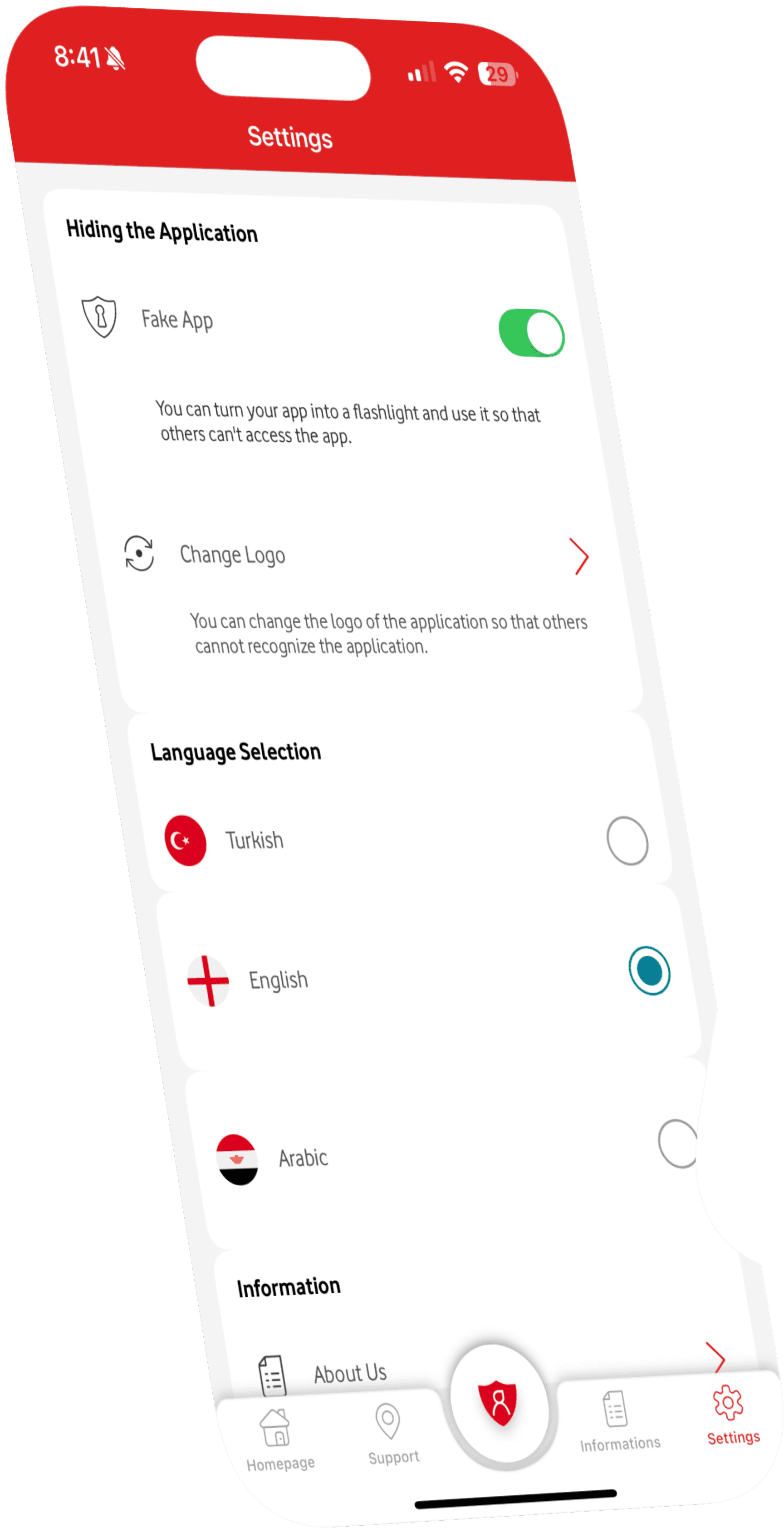
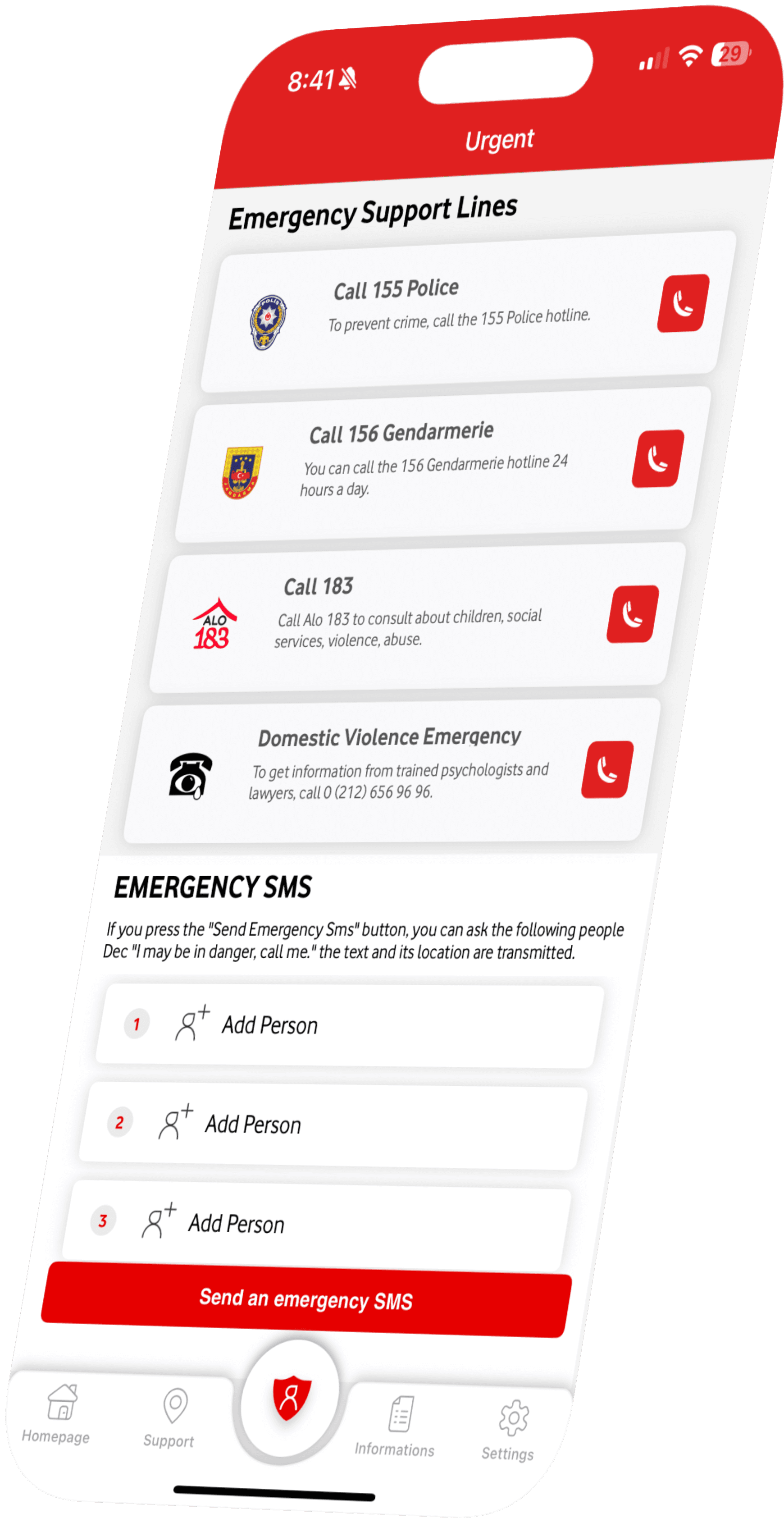
This case study explores hidden and emergency interaction design in a real-world, safety-critical mobile application supporting women experiencing or at risk of violence. It focuses on improving key emergency interactions, including the homepage emergency button and flashlight-based concealment, through sketching, iteration, and redesign.
This case study explores hidden and emergency interaction design in a real-world, safety-critical mobile application supporting women experiencing or at risk of violence. It focuses on improving key emergency interactions, including the homepage emergency button and flashlight-based concealment, through sketching, iteration, and redesign.
This case study explores hidden and emergency interaction design in a real-world, safety-critical mobile application supporting women experiencing or at risk of violence. It focuses on improving key emergency interactions, including the homepage emergency button and flashlight-based concealment, through sketching, iteration, and redesign.
My Role
My Role
My Role
I contributed to interface evolution and redesign efforts under mentorship, focusing on improving the speed and visibility of emergency actions and refining concealment patterns such as the flashlight disguise for high-risk use contexts.
I contributed to interface evolution and redesign efforts under mentorship, focusing on improving the speed and visibility of emergency actions and refining concealment patterns such as the flashlight disguise for high-risk use contexts.
I contributed to interface evolution and redesign efforts under mentorship, focusing on improving the speed and visibility of emergency actions and refining concealment patterns such as the flashlight disguise for high-risk use contexts.
My Contribution
My Contribution
My Contribution
All contributions focused on enabling faster emergency action without drawing attention in high-risk contexts.
All contributions focused on enabling faster emergency action without drawing attention in high-risk contexts.
All contributions focused on enabling faster emergency action without drawing attention in high-risk contexts.
Ideation & Sketching
Ideation & Sketching
Ideation & Sketching
Explored alternative homepage layouts to surface emergency actions faster and reduce visual scanning under panic.
Explored alternative homepage layouts to surface emergency actions faster and reduce visual scanning under panic.
Explored alternative homepage layouts to surface emergency actions faster and reduce visual scanning under panic.
Low-Fidelity Prototyping
Low-Fidelity Prototyping
Low-Fidelity Prototyping
Used low-fidelity prototypes to test faster, more discreet emergency flows before visual refinement.
Used low-fidelity prototypes to test faster, more discreet emergency flows before visual refinement.
Used low-fidelity prototypes to test faster, more discreet emergency flows before visual refinement.
Hierarchy & Concealment
Hierarchy & Concealment
Hierarchy & Concealment
Evaluated and refined visual hierarchy to prioritize emergency actions while supporting concealment features such as the flashlight disguise.
Evaluated and refined visual hierarchy to prioritize emergency actions while supporting concealment features such as the flashlight disguise.
Evaluated and refined visual hierarchy to prioritize emergency actions while supporting concealment features such as the flashlight disguise.
Interaction Reduction
Interaction Reduction
Interaction Reduction
Identified opportunities to reduce interaction steps by prioritizing emergency actions on the home screen.
Identified opportunities to reduce interaction steps by prioritizing emergency actions on the home screen.
Identified opportunities to reduce interaction steps by prioritizing emergency actions on the home screen.
Project Overview
Project Overview
Project Overview
Red light is a mobile safety application designed to support women experiencing or at risk of violence by enabling fast access to emergency support during dangerous situations.
The application was developed by Vodafone Turkey Foundation, as part of the broader social impact initiatives of the Vodafone Group Foundation.
Red light is a mobile safety application designed to support women experiencing or at risk of violence by enabling fast access to emergency support during dangerous situations.
The application was developed by Vodafone Turkey Foundation, as part of the broader social impact initiatives of the Vodafone Group Foundation.
Red light is a mobile safety application designed to support women experiencing or at risk of violence by enabling fast access to emergency support during dangerous situations.
The application was developed by Vodafone Turkey Foundation, as part of the broader social impact initiatives of the Vodafone Group Foundation.
The app allows users to:
The app allows users to:
The app allows users to:
Send emergency SMS messages with location information to trusted contacts
Send emergency SMS messages with location information to trusted contacts
Send emergency SMS messages with location information to trusted contacts
Locate nearby Violence Prevention and Monitoring Centers
Locate nearby Violence Prevention and Monitoring Centers
Locate nearby Violence Prevention and Monitoring Centers
Call emergency services with a single tap
Call emergency services with a single tap
Call emergency services with a single tap
Save up to three emergency contacts for rapid outreach
Save up to three emergency contacts for rapid outreach
Save up to three emergency contacts for rapid outreach
Core Design Challenge
Core Design Challenge
Core Design Challenge
Unlike everyday mobile experiences, Red Light is often used:
Unlike everyday mobile experiences, Red Light is often used:
Unlike everyday mobile experiences, Red Light is often used:
Under panic or fear
In time-critical moments
When users may be observed or monitored
Under panic or fear
In time-critical moments
When users may be observed or monitored
Under panic or fear
In time-critical moments
When users may be observed or monitored
Traditional usability patterns such as clear navigation, visible affordances, and high discoverability can become liabilities in these situations. The interface must be immediately understandable to the user.
Traditional usability patterns such as clear navigation, visible affordances, and high discoverability can become liabilities in these situations. The interface must be immediately understandable to the user.
Traditional usability patterns such as clear navigation, visible affordances, and high discoverability can become liabilities in these situations. The interface must be immediately understandable to the user.
How might we design an emergency app that can be used quickly and discreetly?
How might we design an emergency app that can be used quickly and discreetly?
How might we design an emergency app that can be used quickly and discreetly?
Key Constraints
Key Constraints
Key Constraints
These constraints shaped every design decision explored in this case study.
These constraints shaped every design decision explored in this case study.
These constraints shaped every design decision explored in this case study.
High cognitive load
High cognitive load
High cognitive load
Users may be distressed or overwhelmed
Users may be distressed or overwhelmed
Users may be distressed or overwhelmed
Visibility risk
Visibility risk
Visibility risk
Opening or navigating the app can escalate danger
Opening or navigating the app can escalate danger
Opening or navigating the app can escalate danger
Minimal interaction time
Minimal interaction time
Minimal interaction time
UX decisions affect real safety outcomes
UX decisions affect real safety outcomes
UX decisions affect real safety outcomes
Ethical responsibility
Ethical responsibility
Ethical responsibility
UX decisions affect real safety outcomes
UX decisions affect real safety outcomes
UX decisions affect real safety outcomes
Design Principles
Design Principles
Design Principles
Designing for crisis situations required rethinking standard UX assumptions in safety-critical contexts.
Designing for crisis situations required rethinking standard UX assumptions in safety-critical contexts.
Designing for crisis situations required rethinking standard UX assumptions in safety-critical contexts.
Safety Over Discoverability
Safety Over Discoverability
Safety Over Discoverability
Some features were intentionally less visible to reduce the risk of exposing user intent, even when this meant higher initial learning effort.
Some features were intentionally less visible to reduce the risk of exposing user intent, even when this meant higher initial learning effort.
Some features were intentionally less visible to reduce the risk of exposing user intent, even when this meant higher initial learning effort.
Speed Over Completeness
Speed Over Completeness
Speed Over Completeness
Emergency interactions were simplified to minimize decision-making and interaction steps. The goal was immediate action, not informational depth.
Emergency interactions were simplified to minimize decision-making and interaction steps. The goal was immediate action, not informational depth.
Emergency interactions were simplified to minimize decision-making and interaction steps. The goal was immediate action, not informational depth.
Clarity Over Concealment
Clarity Over Concealment
Clarity Over Concealment
While concealment was essential, interactions still needed to remain predictable and reliable so women could act quickly without having to figure things out under stress.
While concealment was essential, interactions still needed to remain predictable and reliable so women could act quickly without having to figure things out under stress.
While concealment was essential, interactions still needed to remain predictable and reliable so women could act quickly without having to figure things out under stress.
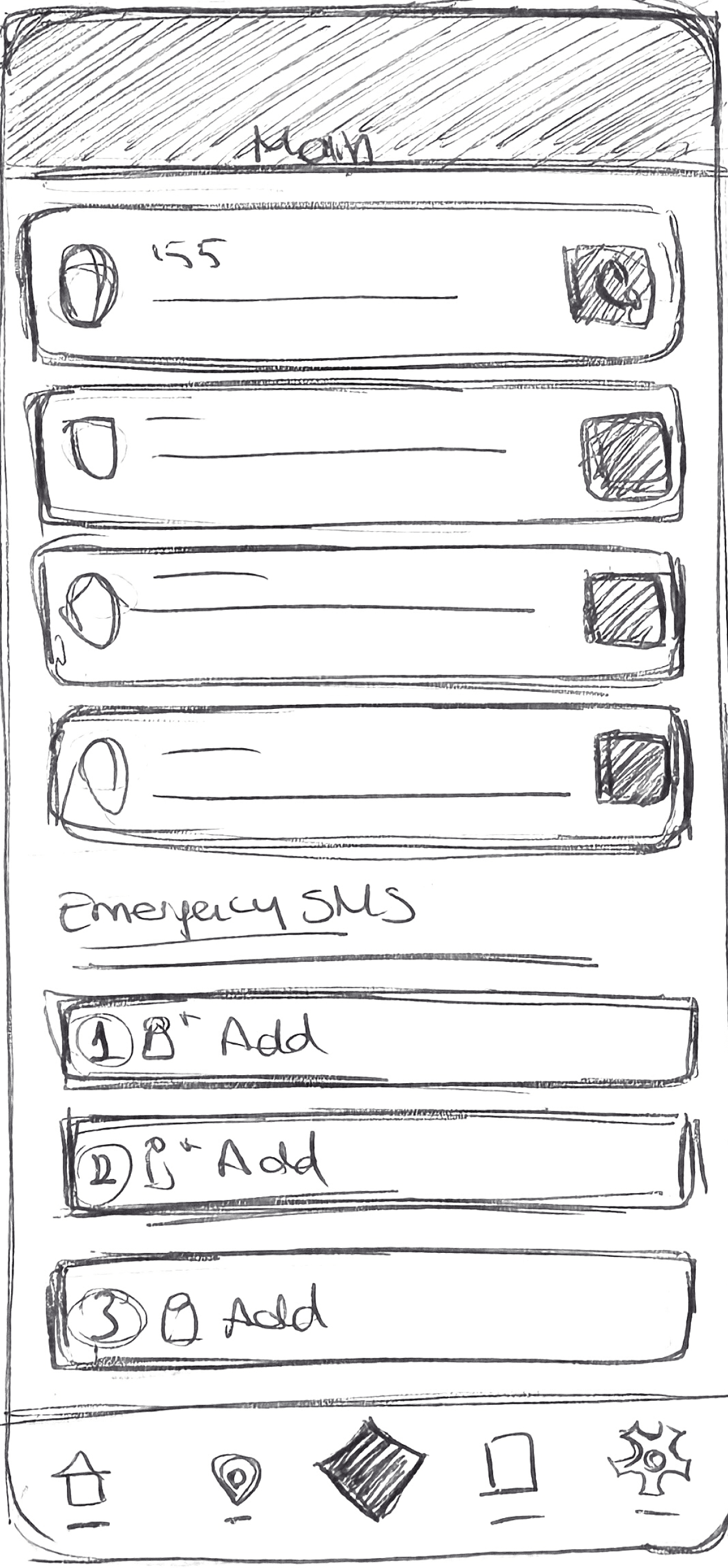
Hand Sketches
Hand Sketches
Hand Sketches
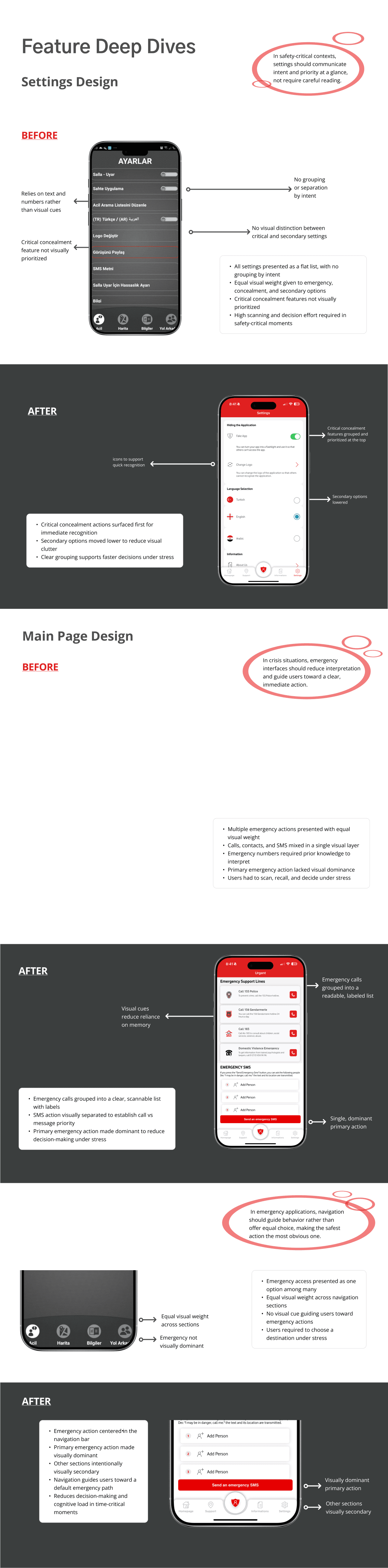
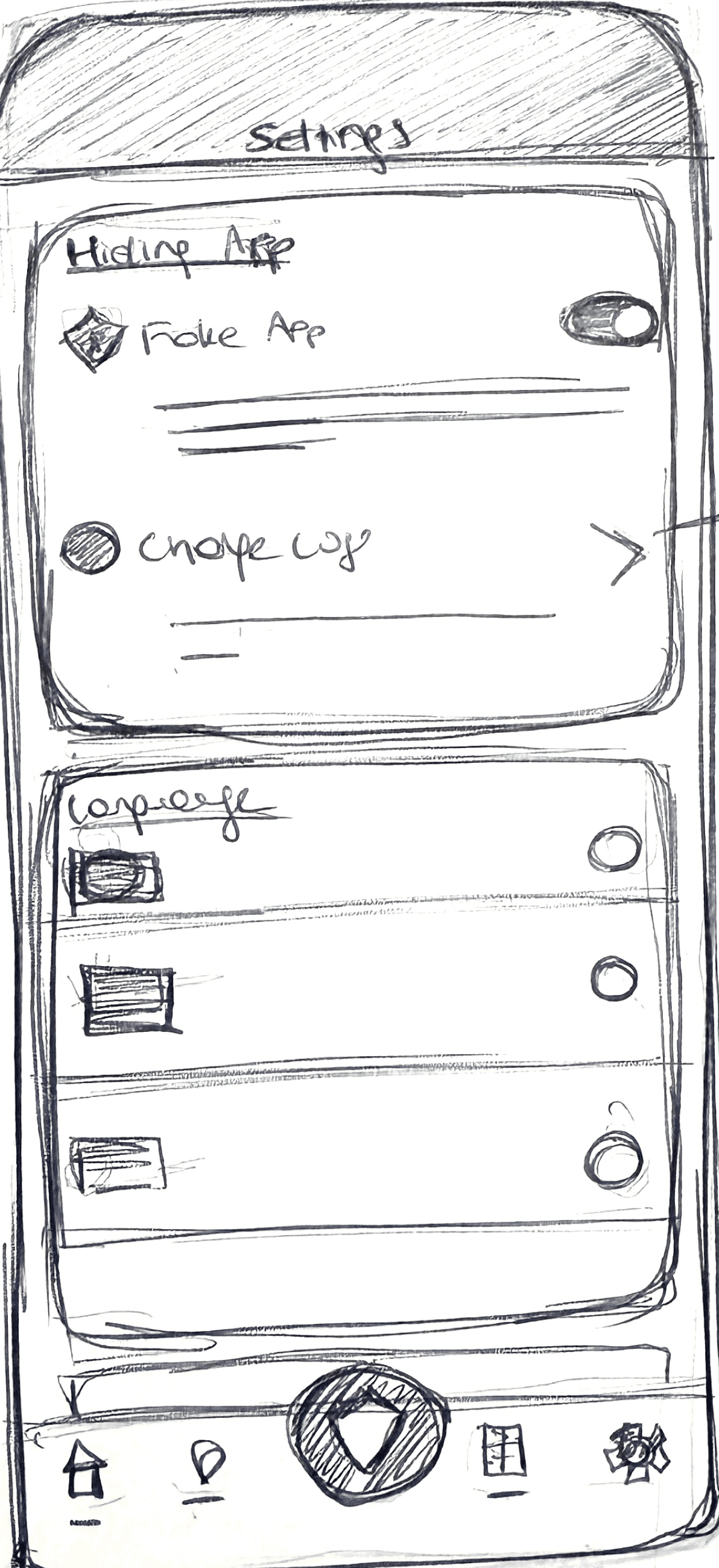
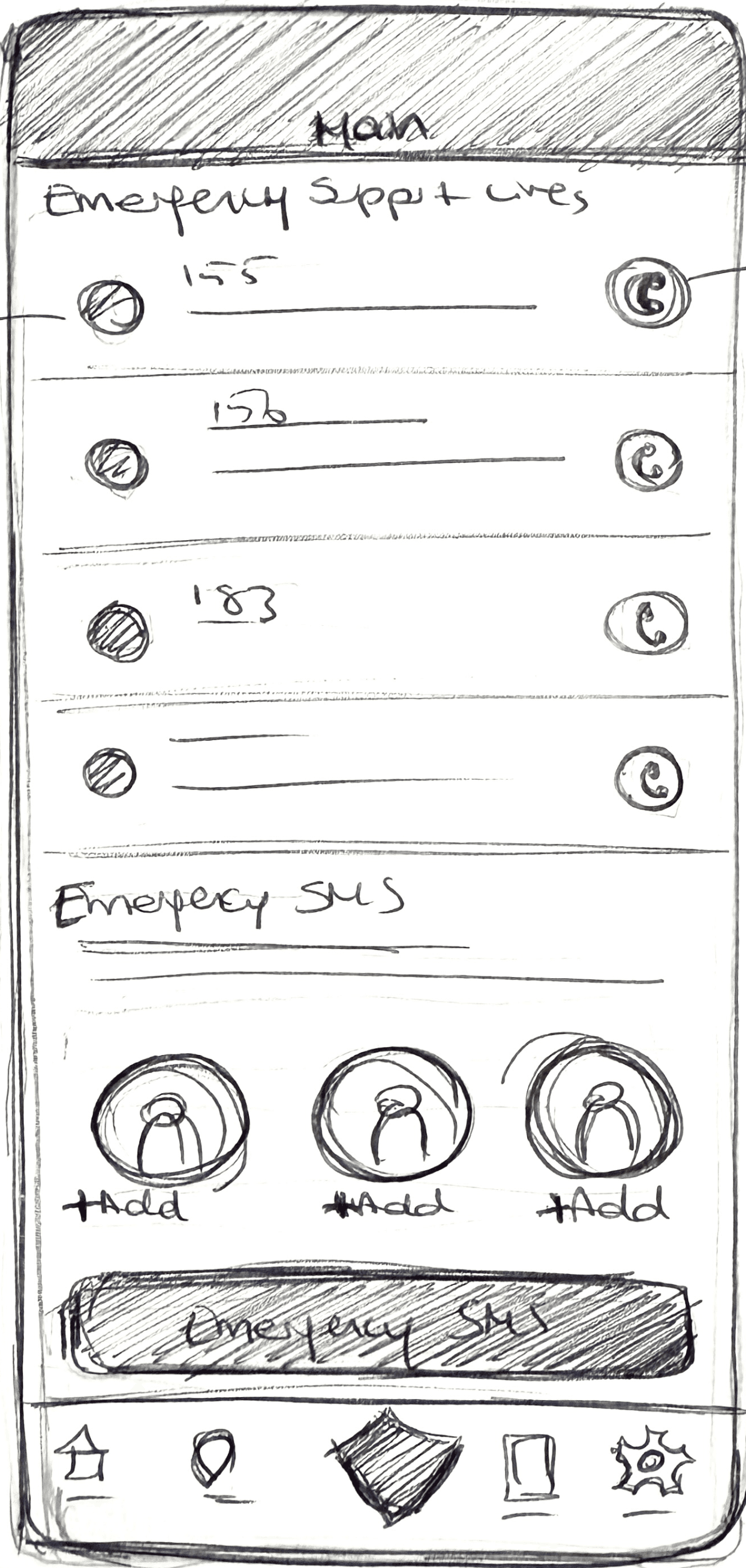
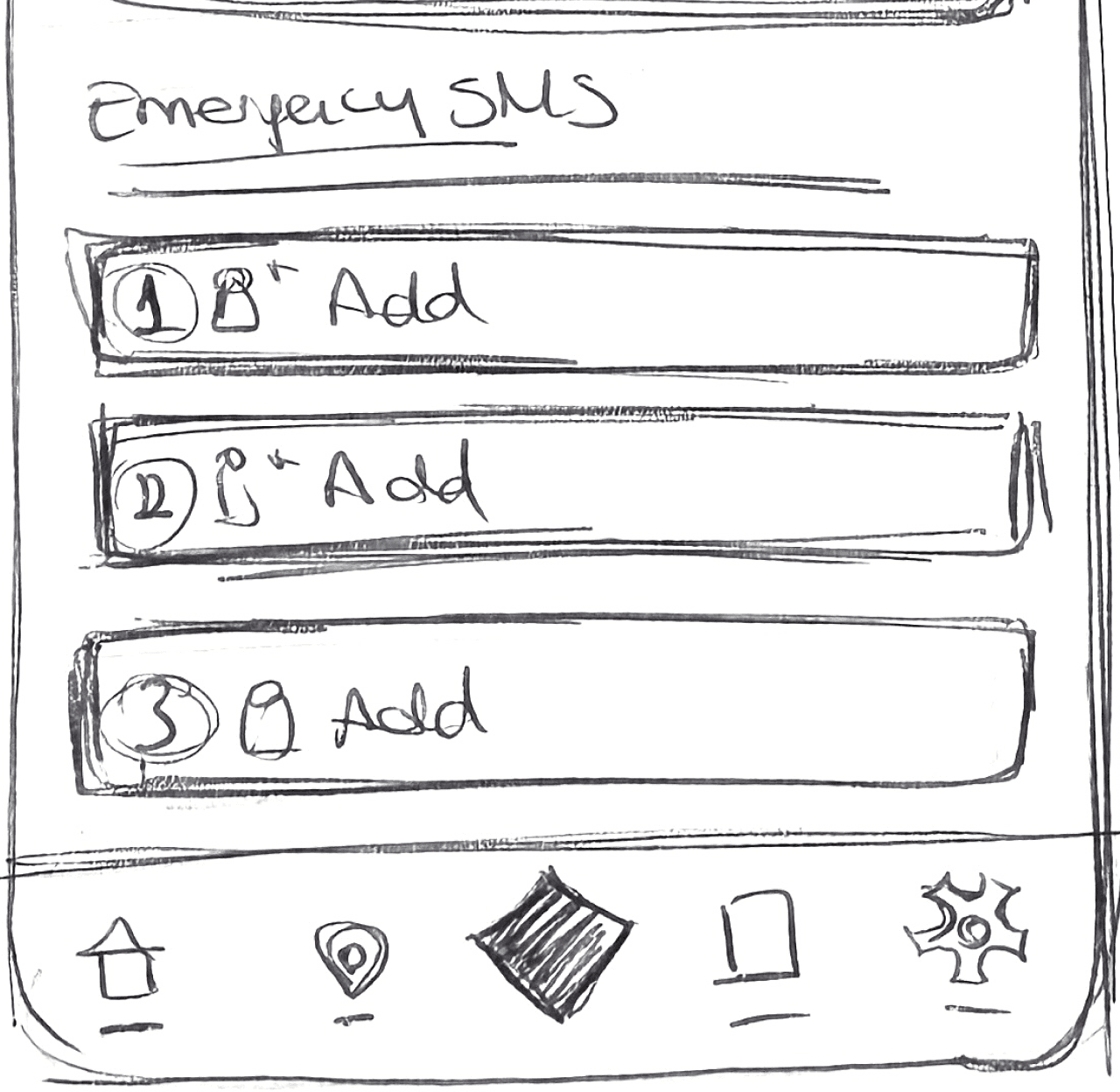
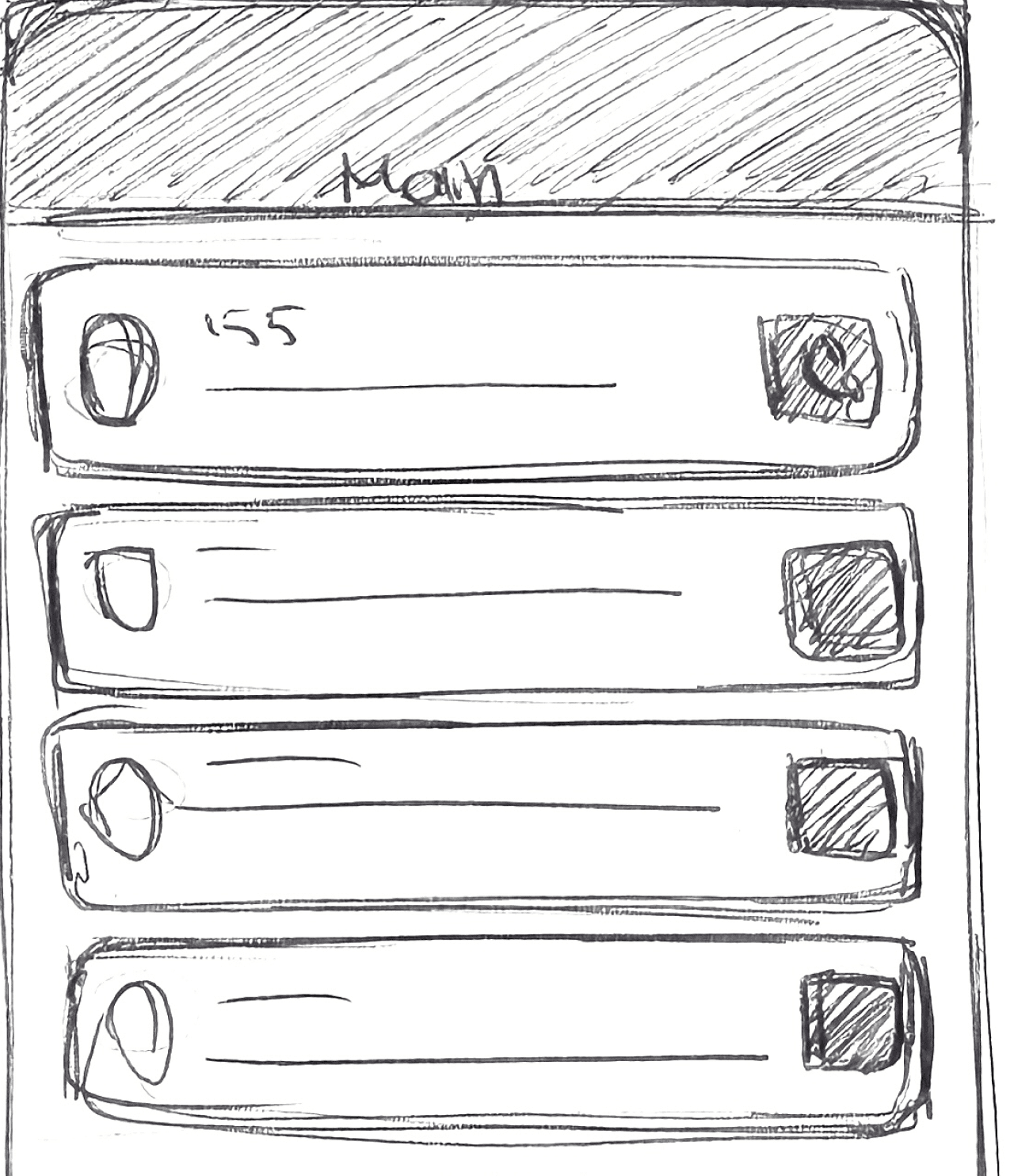
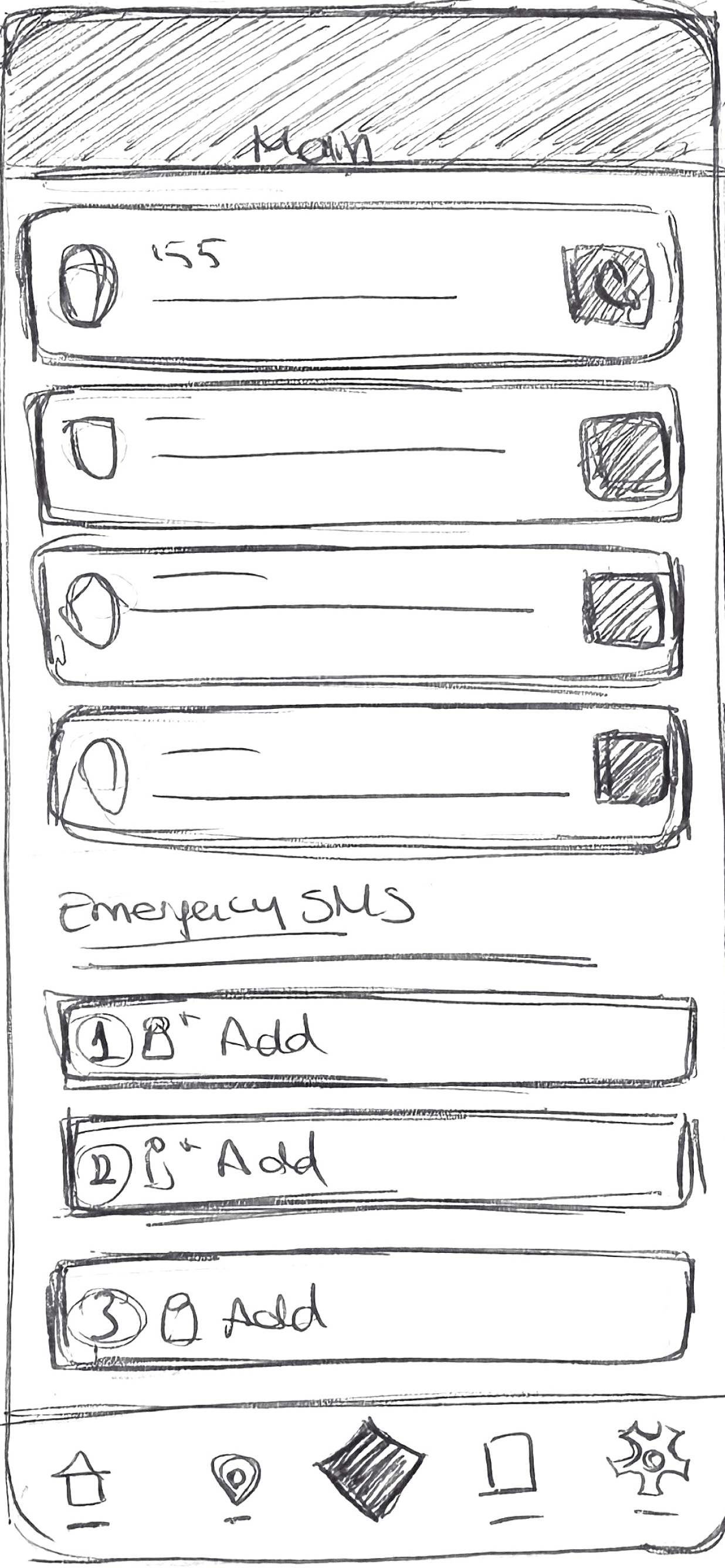
Used hand sketches to quickly explore layout variations focused on reducing visual
scanning and prioritizing
emergency actions.
Used hand sketches to quickly explore layout variations focused on reducing visual
scanning and prioritizing
emergency actions.
Used hand sketches to quickly explore layout variations focused on reducing visual
scanning and prioritizing
emergency actions.
Key Takeaway
Key Takeaway
Key Takeaway
Designing for crisis highlighted that effective UX is not always about clarity or discoverability. In safety-critical systems, design must prioritize protection, speed, and trust, even when that means breaking conventional usability rules.
Designing for crisis highlighted that effective UX is not always about clarity or discoverability. In safety-critical systems, design must prioritize protection, speed, and trust, even when that means breaking conventional usability rules.
Designing for crisis highlighted that effective UX is not always about clarity or discoverability. In safety-critical systems, design must prioritize protection, speed, and trust, even when that means breaking conventional usability rules.
Results
Results
Results
Since its launch, Easy Rescue has been downloaded over 380,000 times and continues to support users in high-stakes emergency situations. Design decisions were informed by qualitative research with women, psychologists, and legal professionals, and the research behind the app received a Gold Award for social impact. UX improvements focused on faster emergency access, clearer hierarchy, and safer concealment, supporting use under stress while improving accessibility and inclusivity.
Since its launch, Easy Rescue has been downloaded over 380,000 times and continues to support users in high-stakes emergency situations. Design decisions were informed by qualitative research with women, psychologists, and legal professionals, and the research behind the app received a Gold Award for social impact. UX improvements focused on faster emergency access, clearer hierarchy, and safer concealment, supporting use under stress while improving accessibility and inclusivity.
Since its launch, Easy Rescue has been downloaded over 380,000 times and continues to support users in high-stakes emergency situations. Design decisions were informed by qualitative research with women, psychologists, and legal professionals, and the research behind the app received a Gold Award for social impact. UX improvements focused on faster emergency access, clearer hierarchy, and safer concealment, supporting use under stress while improving accessibility and inclusivity.
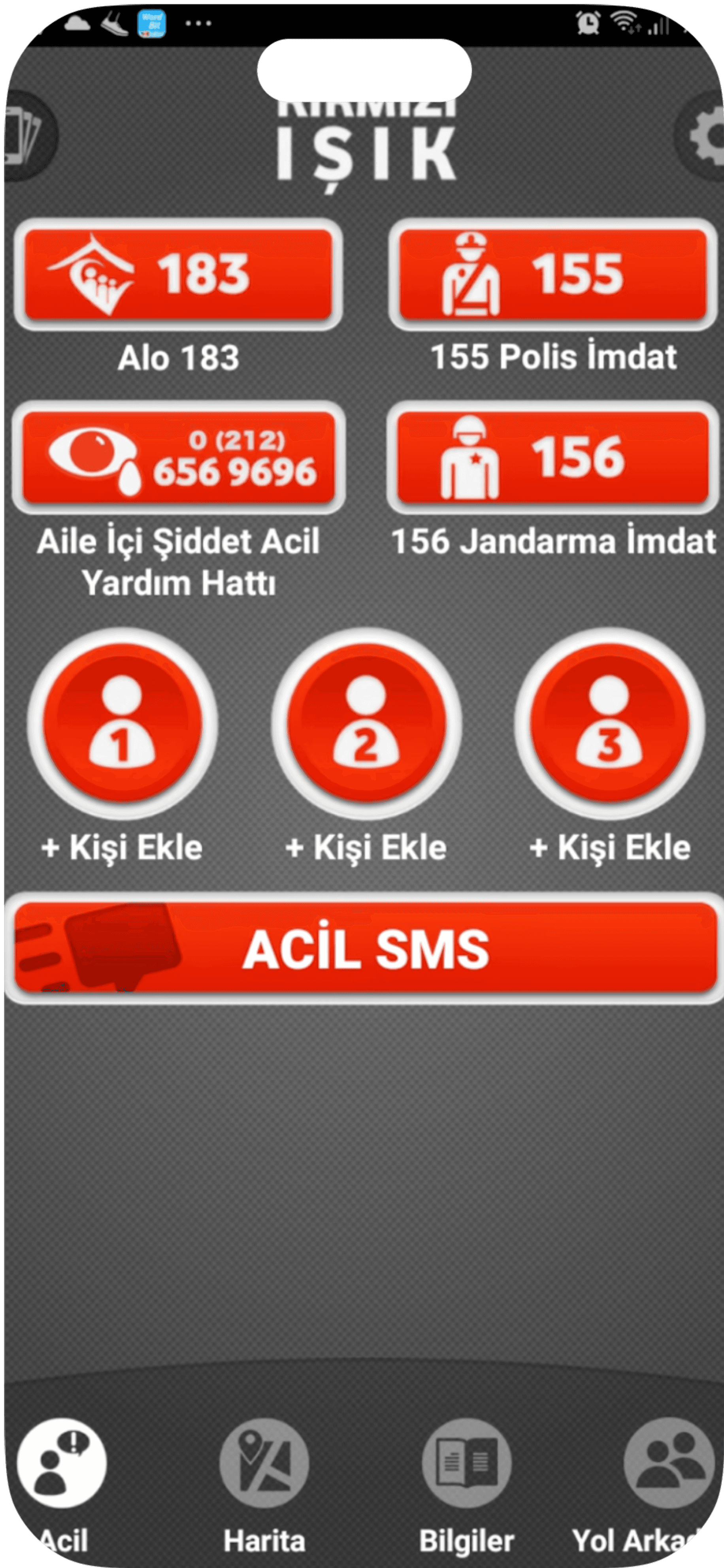
Calls, contacts, and messaging mixed in a single visual layer
Calls, contacts, and messaging mixed in a single visual layer
Calls, contacts, and messaging mixed in a single visual layer
Emergency numbers require prior knowledge
Emergency numbers require prior knowledge
Emergency numbers require prior knowledge
Primary emergency action lacks visual dominance
Primary emergency action lacks visual dominance
Primary emergency action lacks visual dominance
Emergency view competes with secondary navigation
Emergency view competes with secondary navigation
Emergency view competes with secondary navigation
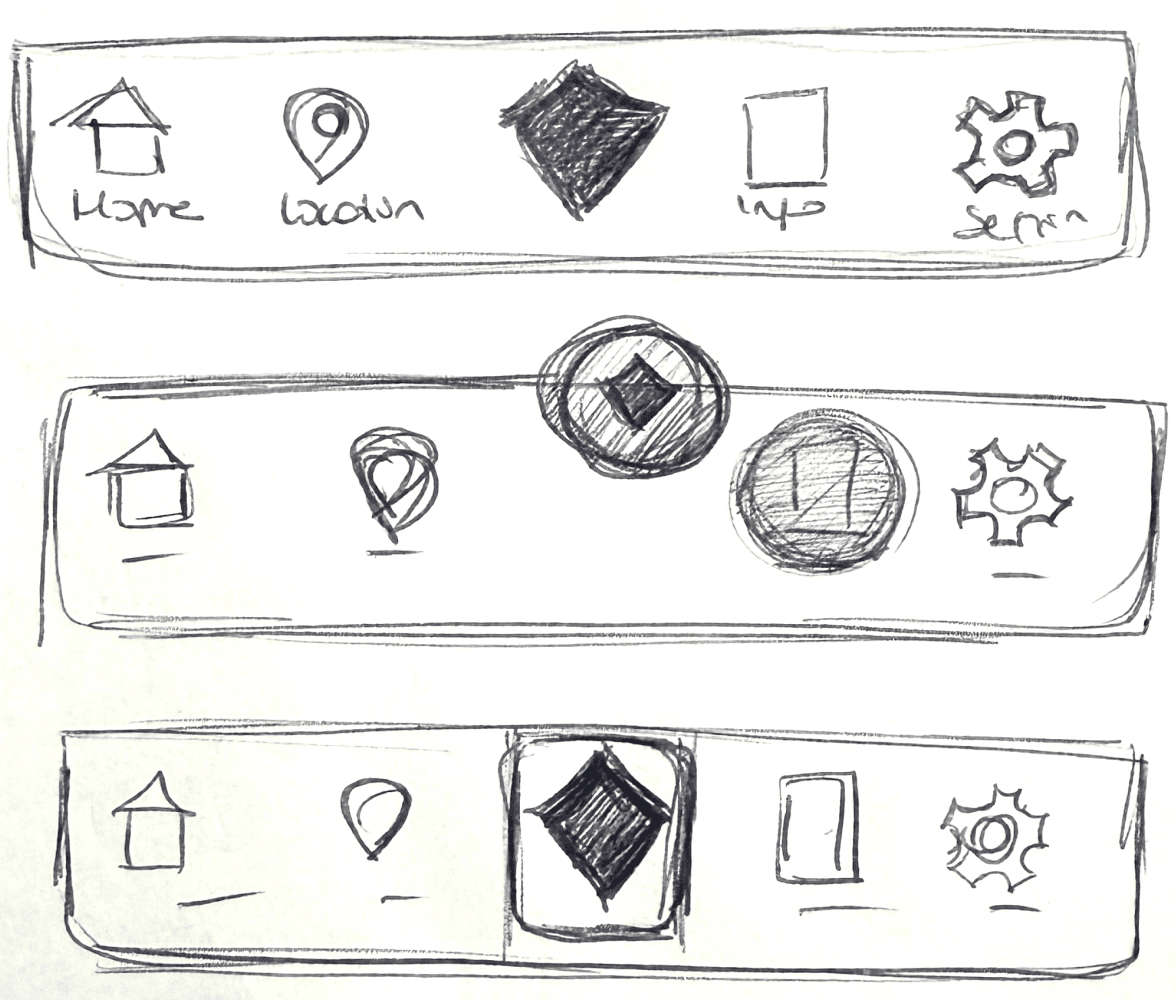
Navigation Design
Navigation Design
Navigation Design
BEFORE
BEFORE
BEFORE